Kubernetes Namespaces: How to Organize, Isolate, and Optimize Your Cluster
In a growing Kubernetes environment, organization and control become critical. That’s where Kubernetes namespaces come in. A namespace acts like a virtual sub-cluster—a logical partition within a Kubernetes cluster that helps group and manage resources like Pods, Services, and Deployments under a common label.
Think of it as separate rooms within a house: each room (namespace) can hold its own furniture (resources), and you can manage access, cleanliness, and layout independently.
What Is a Namespace in Kubernetes?
A namespace provides a way to divide cluster resources between multiple users or teams. Each namespace maintains its own set of resource names, which means two namespaces can have resources with the same name without conflict.
For instance, both Team A and Team B could have a service named backend—as long as they exist in different namespaces (team-a and team-b), Kubernetes will keep them isolated.
However, not everything lives inside a namespace. Some Kubernetes objects—like Nodes and PersistentVolumes—are cluster-scoped and exist outside any specific namespace.
Why Use Namespaces?
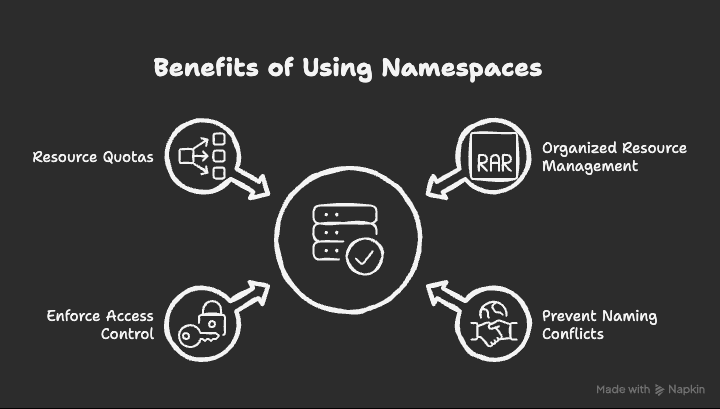
Namespaces aren’t just about tidiness—they’re about organization, isolation, and control.
Organized Resource Management
When multiple teams, projects, or environments (like dev, staging, and prod) share a cluster, namespaces help separate their workloads cleanly. This avoids confusion and keeps configurations organized.
Prevent Naming Conflicts
Without namespaces, every resource in your cluster must have a unique name. With namespaces, two different teams can use the same names (e.g., api, db) without any collision.
Enforce Access Control
Namespaces work hand-in-hand with Role-Based Access Control (RBAC), allowing admins to grant specific permissions per namespace. For example, developers in the dev namespace may not have access to prod.
Resource Quotas
You can apply resource quotas per namespace to limit CPU, memory, or object counts. This ensures fair usage and prevents one team from consuming excessive cluster resources.
Default Namespaces in Kubernetes
Kubernetes ships with several predefined namespaces that serve specific purposes:
| Namespace | Purpose |
|---|---|
default | For user-created resources when no other namespace is specified. |
kube-system | Contains internal Kubernetes components (like the scheduler or controller manager). |
kube-public | Readable by all users; typically used for public cluster information. |
kube-node-lease | Manages node heartbeat leases for cluster health monitoring. |
Understanding these helps avoid accidental modifications to system-critical components.
How to Work with Namespaces
Creating a Namespace
You can create a namespace using either the kubectl CLI or a YAML manifest.
Using CLI:
```bashkubectl create namespace my-namespace
1
2
3

**Using YAML:**
apiVersion: v1 kind: Namespace metadata: name: my-namespace
1
2
3
4
5
6

#### **Viewing Namespaces**

To see all namespaces in your cluster:

```bashkubectl get namespaces
Using a Specific Namespace
To target a specific namespace in commands, use:
```bashkubectl get pods -n my-namespace
1
2
3
4

Or, set your kubectl context to default to a namespace:

```bashkubectl config set-context --current --namespace=my-namespace
Best Practices for Managing Namespaces
Namespaces are powerful—but they should be used thoughtfully. Here are a few best practices:
Use Separate Namespaces for Environments
Separate environments likedev,staging, andprodinto distinct namespaces for cleaner management and safer deployments.Avoid Over-Namespace Fragmentation
Too many namespaces can make your setup overly complex. For small clusters, a single namespace may suffice.Establish Clear Naming Conventions
Use consistent naming patterns liketeam-a-dev,team-a-prod, orprojectX-stagingfor clarity.Implement RBAC and Quotas Per Namespace
Always define RBAC policies and resource quotas to maintain governance and prevent misuse.Monitor and Audit Namespace Usage
Regularly review which namespaces exist, their resources, and their usage to ensure optimal cluster performance and security.
When Not to Use Namespaces
Not every cluster needs multiple namespaces. If your cluster supports a single small team or project, introducing many namespaces can lead to unnecessary complexity. In such cases, the default namespace might be all you need.
FAQs About Kubernetes Namespaces
Can I rename a Kubernetes namespace?
No, Kubernetes doesn’t allow renaming namespaces. You’ll need to create a new one and migrate resources if renaming is necessary.
How do I delete a namespace?
Use the following command:
kubectl delete namespace my-namespace
This deletes all resources within that namespace, so use it carefully.
Are namespaces required for every Kubernetes setup?
Not necessarily. For small clusters or simple projects, a single default namespace may be sufficient.
How can I restrict access to a namespace?
You can configure RBAC roles and bindings to control who can access or modify resources within a namespace.
[Video] Kubernetes Namespaces Explained
https://www.youtube.com/watch?v=CmghE3UCK48
Final Thoughts
Namespaces are the foundation of effective Kubernetes resource management. They bring structure, security, and scalability to shared clusters—helping teams collaborate without interference. Whether you’re managing multiple environments or teams, adopting a well-structured namespace strategy ensures your cluster remains efficient, secure, and easy to manage.
For more details, check the official Kubernetes documentation.